
Cleanvoice Studio Sound is an AI voice isolator. It removes background noise, music beds, other voices and room echo from audio and video. It has no step that cuts what you said.
Try without sign-up. New accounts get 30 free minutes, no credit card.
Listen
One damaged clip: a voice with echo and codec damage
Last updated: 2 November 2026
In this clip from Dolby’s public UNIVERSE test set, the voice has echo, a band-reject filter and AC-3 codec damage. We ran it through Cleanvoice Studio Sound 4.1 and ElevenLabs Voice Isolator, then asked Meta’s Omnilingual ASR what it heard.
Studio Sound gives back the whole sentence, ending included: “some have accepted it as a”. In the original the end comes out garbled, and the ElevenLabs version garbles it too.
What was said: “move for the next couple of days it is not too late to get on board some have accepted it as a”
Selected: Original (damaged input)
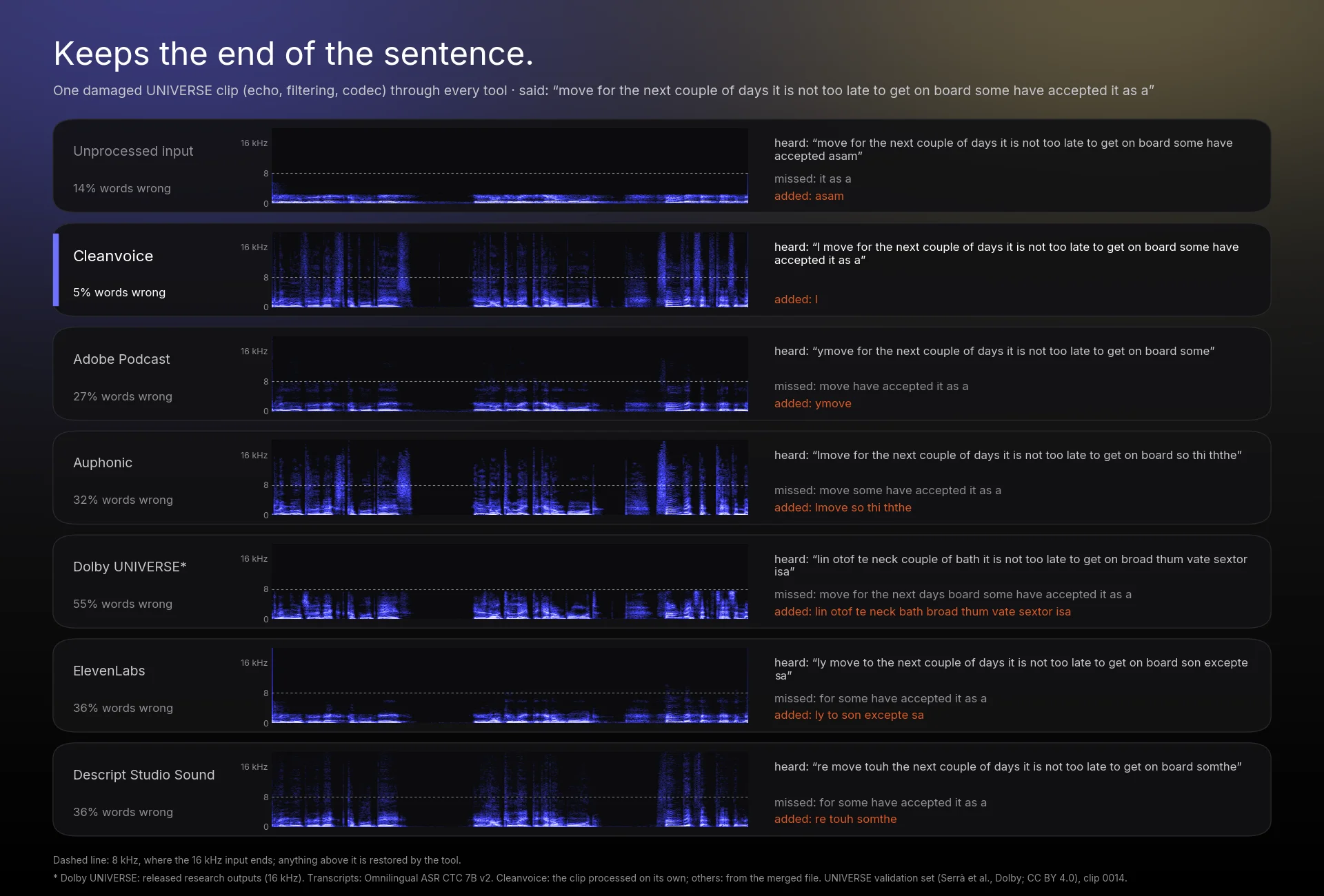
Audio: clip 0014 of the UNIVERSE validation set (Serrà et al., “Universal Speech Enhancement with Score-based Diffusion”, Dolby; CC BY 4.0); the set’s noises include the DEMAND corpus (CC BY-SA). Transcripts: Meta’s Omnilingual ASR (CTC 7B v2).
Benchmark
Cleanvoice vs ElevenLabs Voice Isolator on 100 noisy clips
We ran the 100 clips of Dolby’s UNIVERSE validation set (16 kHz) through each tool on 1 November 2026 with default settings. Cleanvoice and DeepFilterNet3 processed each clip separately; the other products processed the 100 clips joined into one file, which we cut back into clips. Word errors are Meta’s Omnilingual ASR (CTC 7B v2) on each output against the same model on the clean originals.
Studio Sound made fewer word errors than ElevenLabs Voice Isolator, dropped and changed fewer words and kept more of the frequency range. The ElevenLabs output also had more word errors than the unprocessed input (23.8% against 17.0%). See the full benchmark for all eight tools, the method and the limits.
| Measure | Cleanvoice Studio Sound 4.1 | ElevenLabs Voice Isolator | Unprocessed input |
|---|---|---|---|
| Word error rate (lower is better) | 15.5% | 23.8% | 17.0% |
| Dropped words per 100 | 3.0 | 7.1 | 5.9 |
| Changed words per 100 | 11.2 | 15.3 | 10.8 |
| Speech quality, SCOREQ (higher is better) | 4.54 | 3.72 | 2.64 |
| Speaker similarity to the clean voice | 0.955 | 0.928 | 0.916 |
| Median output bandwidth | 17.3 kHz | 11.8 kHz | 8.0 kHz |
| Clips with fewer word errors, head to head | 52 of 100 | 9 of 100 | — |
Head to head: on 52 clips the transcriber made fewer errors on Cleanvoice’s output, on 39 the same number, and on 9 more. Only 16 kHz input was tested, on one dataset, with an automatic transcriber. Cleanvoice AI Research ran the test. More detail: Cleanvoice vs ElevenLabs and the speech enhancement benchmark.
Adobe, Auphonic, Descript, ElevenLabs and Dolby are trademarks of their owners. Tests run by Cleanvoice on 1 November 2026; results may differ on other material.
How to
How to isolate a voice from a recording
Upload your audio or video
Open Cleanvoice and drop in a file: WAV, MP3, M4A, FLAC, MP4, MOV, WebM and more. You can try it without signing up.
Run Studio Sound
The link opens Cleanvoice with Studio Sound selected (Enhance in the app; keep Clean Audio on for noisy recordings). Filler-word, stutter and silence removal are separate options and stay off unless you turn them on.
Download the isolated voice
An hour of audio takes about 5 to 10 minutes. Download the cleaned audio, or your video with the cleaned sound.
From code: send the file to the Cleanvoice API with studio_sound set to true, from Python, JavaScript or REST. See the Studio Sound API.
Use cases
Where a voice isolator helps
Podcasts
Guests on laptop mics, a fan in the room, traffic outside. Studio Sound keeps each voice and removes the rest, track by track when you upload a multitrack recording.
Interviews recorded in cafés
Espresso machines, music over the speakers and the next table’s conversation. Studio Sound keeps the voice closest to the mic and removes the rest.
Video voice-over
Upload the MP4 or MOV as it is. You get the video back with the voice isolated, without splitting out the audio first.
Old recordings
Hiss, hum, codec damage and the narrow sound of old tape or film. Studio Sound reduces the noise and restores bandwidth: in our benchmark, 16 kHz recordings with 8 kHz of bandwidth came back with a median of 17.3 kHz. Badly damaged audio can’t be fully restored, so try a short sample first.
Explainer
Voice isolator vs. noise reduction vs. stem separation
The three names get mixed up, and many “voice isolator” results are really music tools. Here is what each one does.
| Tool | Keeps | Removes | Built for |
|---|---|---|---|
| Noise reduction (filter or noise profile) | Everything above a steady noise floor | Hiss, hum, fans; struggles with noise that changes, like wind or chatter | Light cleanup of fairly clean recordings |
| AI voice isolator (Cleanvoice Studio Sound) | The main voice | Background noise, music beds, other voices, room echo | Speech: podcasts, interviews, video, calls |
| Stem separation | Every part, split into separate tracks | Nothing; it splits a song into vocals, drums, bass and the rest | Music: remixes, karaoke, sampling |
Cleanvoice Studio Sound is built for speech. It is not a tool for pulling vocals out of a song or for mastering music. If you want to keep music under your voice, such as an intro or a soundtrack, turn on Keep Music. For the full set of fixes (noise, echo, EQ, restoration), see the AI audio enhancer.