Here Are Our Top 7 Speech to Text API for Faster, Smarter Podcast Creation

Quick Summary
Podcast teams need accurate transcripts and polished audio without juggling multiple tools. Cleanvoice, Rev AI, Deepgram, Descript, OpenAI Whisper API, AssemblyAI, and Google Cloud Speech-to-Text offer solutions from AI automation to real-time transcription.
Cleanvoice stands out by combining transcription with automatic audio cleanup for quicker, ready-to-publish episodes.
Looking for a Faster Way to Transcribe Podcast Episodes?
Transcribing podcasts can slow down production. Long episodes, multiple speakers, and the need for clean transcripts for show notes, captions, and SEO quickly create workflow bottlenecks.
A reliable speech-to-text API makes all the difference. It cuts hours from production, improves discoverability, and makes repurposing audio easier.
In this Cleanvoice guide, we review the top 7 speech-to-text APIs for faster, smarter podcast creation, comparing their features, pricing, and ideal use cases, so you can choose the best fit for your workflow.
Why Listen to Us?
At Cleanvoice, we built a creator-friendly API that’s easy to use and integrate. It supports over 15,000 creators and 30+ brands with podcast editing, transcription, and post-production at scale. The result is faster turnarounds, cleaner audio, and reliable transcripts.
That hands-on experience shapes this guide. We evaluate each tool based on accuracy, speed, scalability, and how well it fits real podcast workflows.
What is a Speech-to-Text API?
A Speech-to-Text Application Programming Interface (API) automatically converts podcast audio into written text. Podcast creators and developers use it to generate transcripts, show notes, captions, and chapters faster. It removes manual transcription work and makes episodes searchable and reusable.
Why Is a Speech-to-Text API Important for Podcast Production?
- Automated Transcription: Converts podcast audio into accurate text without manual effort.
- Faster Content Production: Speeds up the creation of transcripts, show notes, and captions.
- Content Repurposing: Makes it easier to transform podcast episodes into blogs, clips, and social posts.
- Improved Discoverability: Helps podcasts appear in search through readable, indexable text.
- Scalable Workflows: Supports high-volume podcast production without extra manual work.
Top 7 Speech-to-Text API for
- Cleanvoice
- Rev AI
- Deepgram
- Descript
- OpenAI Whisper API
- AssemblyAI
- Google Cloud Speech‑to‑Text
Cleanvoice
Cleanvoice combines speech-to-text transcription with AI-powered audio editing in one workflow, removing the need for multiple tools. You upload your podcast, and the AI cleans up filler words, background noise, and mouth sounds while creating an accurate transcript.

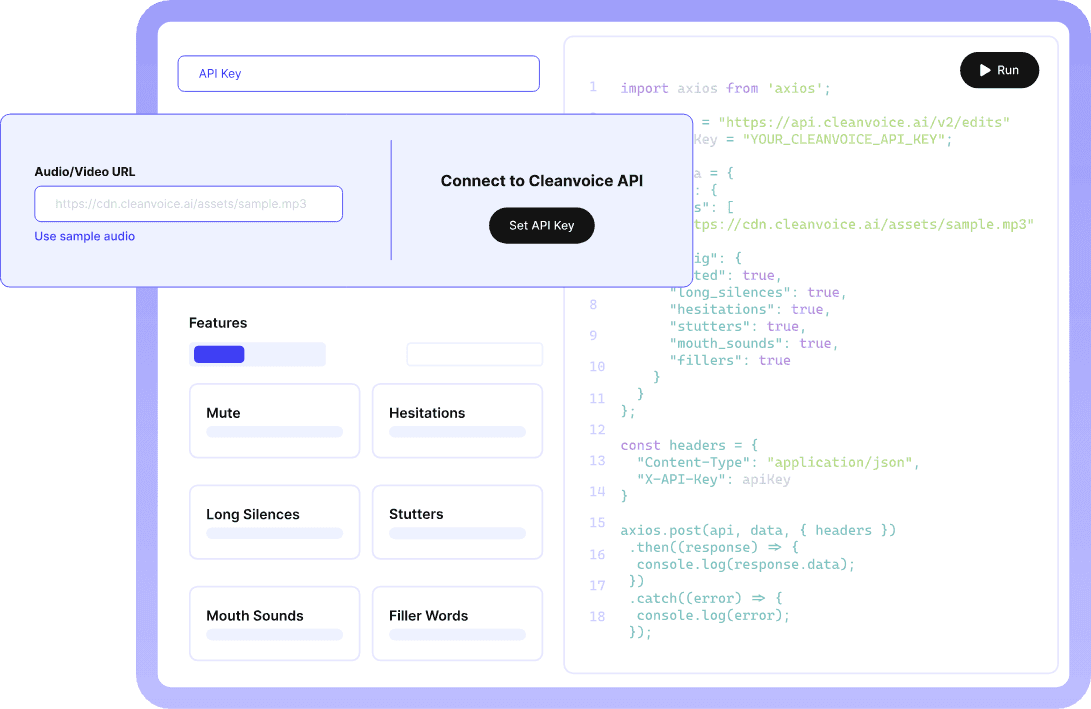
The integration with Make.com lets your team set up a fully automated workflow, so you spend less time editing and more time focusing on content. Episodes go from raw recordings to polished audio and ready-to-use transcripts with minimal effort.
Key Features
- Integrated Speech-to-Text Transcription: Converts audio into accurate transcripts while editing the audio, eliminating the need for separate services.
- Filler Word Detection & Removal: Removes filler words like "uh," "um," and "like" from both audio and transcript for cleaner content.
- Speaker Labeling: Identifies different speakers in multi-host podcasts or interviews, making transcripts easier to follow.
- Timestamp Sync: Keeps transcript text and audio edits perfectly aligned for chapter markers and searchability.
- Make.com Integration: Connect Cleanvoice to any app using Make.com and automate transcription flow.
- Supports 20+ Languages: You can covert your speech to text in multiple languages and accents. With accurate results.
You can save transcription to any editor or sheets, and directly fetch it for your podcast, YouTube, or any hosting platform.
- Single API for editing and transcription: If you need transcription for audio/video at scale or want to integrate it into your project, you can use Cleanvoice's API. You can set it up in 5 clicks and get your first transcription API call in minutes.
- Timeline Export and Markers with Transcript: Exports synchronized transcripts and edit decision lists, allowing producers to fine-tune content while preserving accuracy.
Pricing

-
A Free Trial with 30 minutes of credit
-
Pay-As-You-Go:
- 5 hours/month for $11
- 10 hours/month for $20
- 30 hours/month for $45
-
Subscription Model (billed monthly):
- 10 hours/month for $11 ($1.10/hour)
- 30 hours/month for $30 ($1.00/hour)
- 100 hours/month for $90 ($0.90/hour)

- Custom Enterprise Plan: 200+ hours/month, custom endpoints, and priority support.
Pros
- Automates podcast editing and saves you hours of manual editing. And it also saves you the time of removing all fillers from your transcription.
- Combines transcription and audio cleanup in a single workflow, reducing tool juggling
- Automates repetitive tasks via API, saving team coordination time
- Keeps multi-speaker episodes organized and transcripts clear
- Gives control to advanced editors with timeline export for detailed post-production
- Also gives you a summary of your hours-long recording
- Supports multiple transcription formats for your usecase
Cons
- Not ideal if you only need raw transcription without audio cleanup
Rev AI
Rev AI provides speech-to-text transcription, offering both automated and human-reviewed transcription options through a straightforward API. You get accurate transcripts quickly, with speakers clearly labeled and timestamps for easy navigation.
It’s best for podcasters who need reliable transcripts for show notes, blog posts, or accessibility, but handle audio editing separately through other tools.

Key Features
- Automated Speech-to-Text Transcription: Converts audio into text using Rev’s ASR models.
- Speaker Identification: Labels speakers automatically for multi-host episodes.
- Custom Vocabulary: Supports industry terms, brand names, and jargon for improved accuracy in niche podcasts.
- Timestamp Precision: Offers word-level timestamps for precise navigation and chapter creation.
- Multiple Output Formats: Exports transcripts in JSON, SRT, VTT, and text formats for different workflows.
Pricing

-
Free Trial: Includes credits equivalent to 5 hours of Reverb ASR (usable across products).
-
Automated Speech-to-Text (AI Models):
- Reverb Transcription (English): $0.20/hour.
- Reverb Turbo (English): $0.10/hour.
- Reverb Foreign Language (54+ languages): $0.30/hour.
- Whisper Fusion/Medium/Large (English): $0.005/minute (~$0.30/hour).
-
Enterprise Plans: Custom pricing with volume discounts, SLAs, and dedicated support.
Pros
- Produces fast, accurate transcripts for podcasts and interviews.
- Keeps multi-host conversations organized with automatic speaker labeling.
- Supports specialized vocabulary for niche or technical content.
Cons
- Costs can add up for large volumes of audio
- Slower turnaround on large batches
Deepgram
Deepgram delivers real-time and pre-recorded speech-to-text transcription using deep learning models optimized for speed and accuracy. The API handles multiple speakers, custom vocabulary, and streaming audio, useful for live podcast recordings or interview transcription.
It works well for podcast networks processing high volumes of content that need fast turnaround times and custom language models.

Key Features
- Real-Time Streaming Transcription: Transcribes live podcasts instantly, ideal for live shows or immediate transcripts.
- Fast Batch Processing: Processes pre-recorded episodes in seconds, much faster than real-time services.
- Custom Model Training: Customizes transcription for specific vocabulary, accents, or audio patterns in your podcast.
- Multichannel Audio Support: Supports separate audio tracks for each speaker, enhancing accuracy in multi-mic setups.
- Confidence Scoring: Provides accuracy scores for each word, highlighting areas that may need review.
Pricing
Deepgram offers three main plans:

- Pay As You Go: Free $200 of credit, then usage-based pricing.
- Growth: Starts at $4,000+ per year, with prepaid annual credits and discounts (up to 20%).
- Enterprise: Custom pricing for large volumes, deployment needs, or support requirements.
Pros
- Supports fast delivery of transcripts even for large or live recordings
- Real-time streaming enables live podcast transcription during recording
- Multichannel support improves accuracy in multi-microphone podcast setups
Cons
- A developer-focused setup may feel complex for creators
- Advanced features require configuration
Descript
Descript's API offers speech-to-text transcription integrated with its text-based editing platform, letting teams edit audio directly through the transcript. It automatically separates speakers and captures niche terms, speeding up production. Teams can quickly process episodes at scale while fine-tuning models for accents or audio setups.

Key Features
- Text-Based Audio Editing: Edits podcast audio by modifying the transcript, making it easy for non-technical team members.
- Overdub Voice Cloning: Creates a synthetic voice to correct mispronunciations or add missing words without re-recording.
- Automatic Chapter Creation: Analyzes transcripts and suggests chapter markers based on topic shifts in conversations.
- Collaborative Transcripts: Enables multiple team members to review and edit transcripts at the same time for faster show notes.
- Filler Word Detection: Highlights filler words in transcripts for easy removal during editing.
Pricing

- Free: $0 per user per month with 1 media hour, basic text-based editing, and limited AI tools.
- Hobbyist: $24 per user per month with 10 media hours, 400 AI credits, watermark-free 1080p export, and core AI features.
- Creator: $35 per user per month with 30 media hours, 800 AI credits, unlimited AI tools, and 4K export.
- Business: $65 per user per month with 40 media hours, 1,500 AI credits, team collaboration tools, and priority support.
- Enterprise: Custom pricing for large teams with advanced security, admin controls, and custom usage limits.
Pros
- Speeds up post-production by letting teams edit without juggling multiple tools.
- Makes collaboration easier for teams working on the same podcast episode
- Saves time by fixing errors without re-recording content
Cons
- Not built as a pure API-first solution
- Limited control over transcription models
OpenAI Whisper API
The OpenAI Whisper API is a speech-to-text service built on an open-source model known for generating accurate transcripts across accents and languages. It supports transcription and translation for podcasts, interviews, and recordings, performing well even with noisy or low-quality audio.
Teams typically use Whisper as a transcription engine within a broader workflow, pairing it with separate tools for audio editing, noise reduction, and post-production cleanup.

Key Features
- Multilingual Support: Transcribes audio in nearly 100 languages for international podcasts.
- Accent Robustness: Effectively handles various accents and speaking styles, minimizing errors in global interviews.
- Low-Quality Audio Handling: Retains accuracy even with poor audio, ideal for remote guest or phone recordings.
- Automatic Language Detection: Automatically detects the spoken language, no manual input needed.
- Open-Source Model: Based on open-source technology, allowing customization and self-hosting for podcast networks.
Pricing
Flat Rate: $0.006 per minute of audio for transcription and translation across all supported languages.
Pros
- Strong accent recognition reduces errors with diverse guest speakers
- Handles poor audio quality reasonably well for remote interview recordings
- Flexible enough to fit into custom or self-hosted production pipelines
Cons
- Requires additional tools for speaker labeling and audio cleanup
- Not optimized for real-time or ultra-fast batch transcription workflows
AssemblyAI
AssemblyAI offers speech-to-text with built-in audio intelligence features for podcast teams that want more than transcripts. It helps teams analyze episodes at scale by automatically surfacing themes, sentiment, and sensitive content. This makes it a strong fit for podcasts focused on analytics, compliance, or content insights, especially when transcripts feed into dashboards, CMSs, or downstream automation.

Key Features
- Content Safety Detection: Flags sensitive content, profanity, or topics needing warnings for podcast compliance.
- Topic Detection: Identifies key topics in episodes, enhancing searchability and discoverability.
- Sentiment Analysis: Analyzes emotional tone to understand audience engagement and content performance.
- Entity Recognition: Extracts names, organizations, and locations for automated show notes and SEO.
- PII Redaction: Finds and removes personal details from transcripts to protect privacy and meet compliance needs.
Pricing
- Usage-Based Pricing:
- Standard and streaming transcription: ~$0.15 per hour
- Higher-accuracy model: ~$0.27 per hour
- Advanced features are billed separately based on usage.

Pros
- Helps teams turn transcripts into structured data for analytics and reporting.
- Reduces manual tagging and review for compliance-heavy or sensitive content.
- Ideal for scaling podcast operations with insight-driven workflows.
Cons
- Less intuitive for creators focused purely on production speed
- Creator-focused editing tools are limited
Google Cloud Speech-to-Text
Google Cloud Speech-to-Text is built for teams running podcast production at scale. It handles large volumes reliably, supports global audiences with extensive language coverage, and fits easily into existing Google-based workflows.
For organizations already using Google Cloud or Workspace, it offers a dependable way to generate transcripts without managing separate infrastructure.

Key Features
- 125+ Language Variants: Supports a wide range of languages and dialects for global podcasting.
- Speaker Diarization: Automatically distinguishes up to 8 speakers, perfect for panel discussions and roundtables.
- Automatic Punctuation: Adds punctuation to transcripts, creating readable show notes instantly.
- Profanity Filtering: Censors explicit content in transcripts for clean versions or compliance.
- Google Workspace Integration: Works seamlessly with Google Drive, Docs, and related tools.
Pricing
Pay-per-use model. First 60 minutes free each month. Standard transcription typically costs around $0.016 per minute, with pricing varying by model and volume.
Pros
- Reliable choice for high-volume, enterprise podcast workflows
- Strong language support for international shows
- Fits naturally into Google-centric tech stacks
Cons
- Pricing can be complex and hard to predict
- Requires familiarity with Google Cloud setup and billing
Automate Transcription and Audio Cleanup With Cleanvoice
Many speech-to-text tools stop at transcription, prioritizing accuracy, language coverage, or analytics. Cleanvoice goes a step further by combining transcription and audio cleanup in one simple, automated workflow.
Cleanvoice creates clear transcripts and clean, ready-to-publish audio at the same time.
It removes filler words, stutters, mouth sounds, and background noise as it transcribes, helping teams cut post-production time by up to 95%. With Make.com API integration, your workflow runs automatically from upload to export.
Sign up at Cleanvoice today for cleaner, faster, and more professional podcasts.