Head to head · 100 clips
Cleanvoice Studio Sound vs Descript Studio Sound
Both products use the name Studio Sound: this page compares Cleanvoice Studio Sound 4.1 with Descript Studio Sound. On 100 noisy clips from Dolby's public UNIVERSE set, Cleanvoice made 15.5% word errors against 25.4% for Descript, and changed 11.2 words per 100 against 16.1. Both reached 17.3 kHz of bandwidth, the widest of the tools we tested.
Last updated: 2 November 2026 · 100 clips from Dolby’s public UNIVERSE set · Full benchmark
Word error rate (lower is better)
15.5%
Cleanvoice, vs 25.4% for Descript
Changed words (lower is better)
11.2%
Cleanvoice, vs 16.1% for Descript
Speech quality (SCOREQ) (higher is better)
4.54
Cleanvoice, vs 3.99 for Descript
Head to head on every metric
Descript Studio Sound against Cleanvoice Studio Sound 4.1, with the unprocessed input for context. Same 100 clips, run on 1 November 2026: Cleanvoice processed each clip separately; the other tools processed the 100 clips joined into one file. Method and all eight tools.
| Metric | Unprocessed input | Descript | Cleanvoice Studio Sound 4.1 | Better |
|---|---|---|---|---|
| Word error rate ↓Omnilingual ASR on the output vs on the clean original | 17.0% | 25.4% | 15.5% | Cleanvoice |
| Dropped words ↓Deletions per 100 reference words | 5.9% | 8.1% | 3.0% | Cleanvoice |
| Changed words ↓Substitutions per 100 reference words | 10.8% | 16.1% | 11.2% | Cleanvoice |
| Speech quality (SCOREQ) ↑Natural speech quality, 1 to 5 | 2.64 | 3.99 | 4.54 | Cleanvoice |
| Overall quality (DNSMOS OVRL) ↑DNSMOS P.835 overall score, 1 to 5 | 2.27 | 3.24 | 3.35 | Cleanvoice |
| Speaker similarity ↑How close the voice stays to the clean original | 0.916 | 0.933 | 0.955 | Cleanvoice |
| Intelligibility (ESTOI) ↑Against the clean reference | 0.714 | 0.803 | 0.840 | Cleanvoice |
| PESQ ↑Against the clean reference | 1.55 | 1.85 | 1.88 | Cleanvoice |
| Bandwidth ↑Median output bandwidth; the input stops at 8 kHz | 8.0 kHz | 17.3 kHz | 17.3 kHz | Tie |
Cleanvoice leads on 8 of the 9 metrics, and the other is a tie: both reached 17.3 kHz of bandwidth. The Descript word error rate (25.4%) was the highest of the eight tools and higher than the unprocessed input (17.0%).
↓ lower is better, ↑ higher is better. Dropped and changed words are per 100 reference words. Word error rate also counts words the transcriber added, so those two don’t add up to it.
Clip by clip
Of the 100 clips, Cleanvoice had fewer word errors than Descript on 50, the same number on 40 and more on 10.
- 50Cleanvoice betterfewer word errors
- 40Sameequal word errors
- 10Descript betterCleanvoice had more word errors
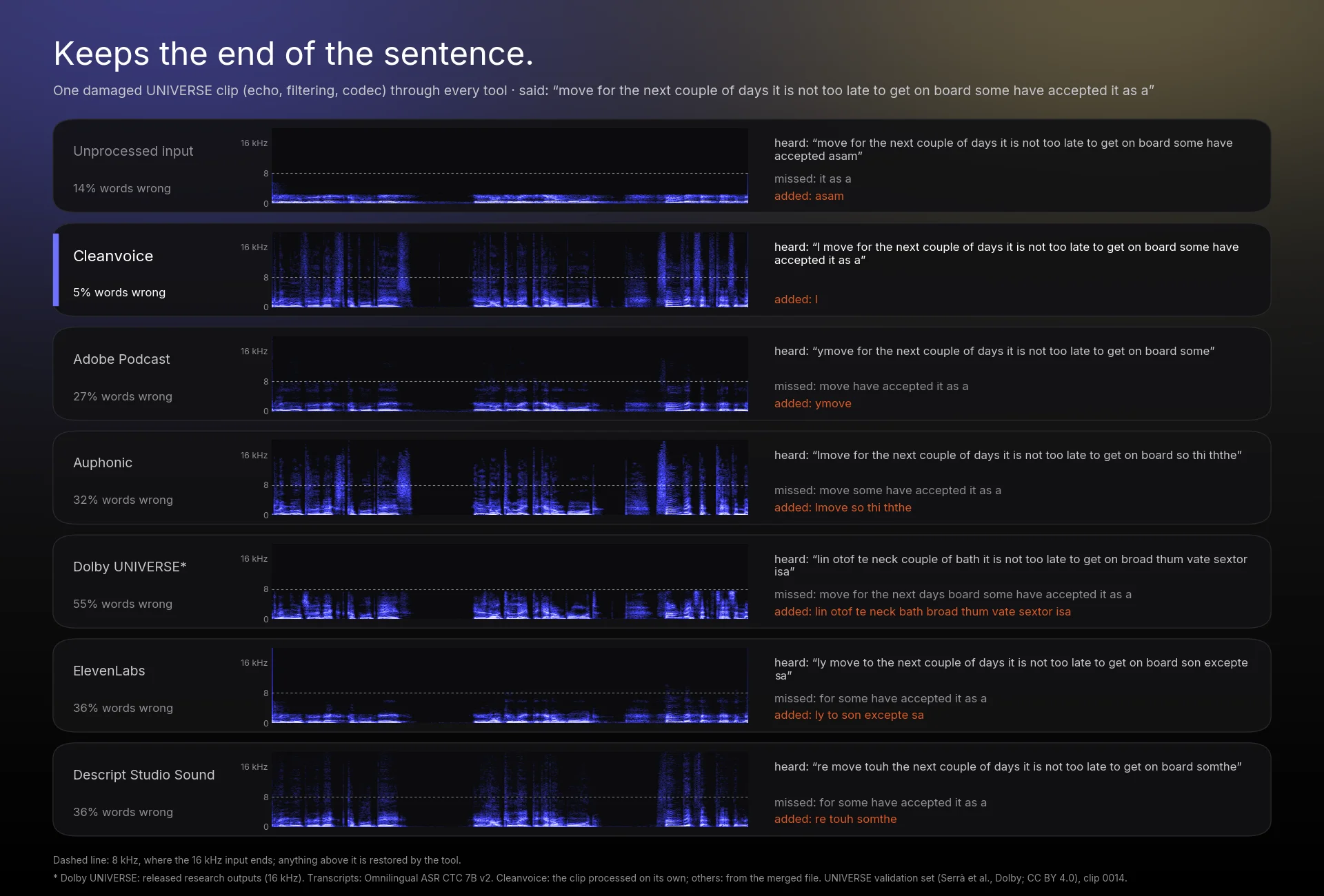
Listen: clip 0014
A damaged clip: echo, a band-reject filter and AC-3 codec damage. The speaker says: “move for the next couple of days it is not too late to get on board some have accepted it as a”. Listen for the end of the sentence, “some have accepted it as a”.
Clip 0014
Selected: Original (unprocessed)
Which one to choose
When to choose Descript Studio Sound
- You already edit in Descript. Descript Studio Sound is built into the Descript editor, so it stays in the project you are working on.
When to choose Cleanvoice
- You want fewer word errors. Descript changed 16.1 words per 100 and dropped 8.1; Cleanvoice changed 11.2 and dropped 3.0.
- You want higher speech quality: SCOREQ 4.54 vs 3.99 and DNSMOS 3.35 vs 3.24.
- You want enhancement that only works on the sound. Cleanvoice Studio Sound removes background noise, echo and other voices and restores bandwidth. It has no step that cuts or rewrites words.
- You may also want editing later. Filler-word, stutter and silence removal are separate, optional Cleanvoice edits. You choose whether to use them, and Studio Sound works without them.
- You want enhancement without moving into a new editor. Cleanvoice takes your audio or video file in the web app or the API and gives it back enhanced.
More on what it fixes: Cleanvoice Studio Sound, the AI audio enhancer.
How we tested
- Data: the 100 noisy clips of Dolby’s public UNIVERSE validation set (Serrà et al., CC BY 4.0; noises include DEMAND, CC BY-SA).
- Processing: each tool’s own product or API on 1 November 2026, at default enhancement settings. Cleanvoice processed each clip separately; the other tools processed the 100 clips joined into one 8.4-minute, 16 kHz file, which we cut back into clips. Dolby UNIVERSE is the paper’s released research outputs.
- Word metrics: Meta’s Omnilingual ASR (CTC 7B v2) transcripts of each output against the same model on the clean originals (1,423 words). CTC models generally don’t hallucinate the way models with a language model do. Word error rate also counts words the transcriber added, so dropped and changed words don’t add up to it.
- Quality: SCOREQ and DNSMOS P.835 OVRL. Speaker similarity, ESTOI and PESQ are measured against the clean original.
- Limits: one dataset, 100 clips, 16 kHz input only, an automatic transcriber, and a test run by Cleanvoice itself.
The full method, every tool’s numbers and more audio are on the speech enhancement benchmark page.
Descript comparison questions
More comparisons and the full benchmark
- Speech enhancement benchmarkAll eight tools on 100 noisy clips: every metric, the method and the audio.
- Cleanvoice Studio Sound, the AI audio enhancerBackground noise removal, voice isolation, de-reverb and bandwidth extension in one pass.
- Adobe Podcast Enhance Speech alternativeFor creators leaving Adobe Podcast, with the ranked table.
- Auphonic alternativeFor people leaving Auphonic, with the ranked table.
- Cleanvoice vs Adobe PodcastEvery metric, head to head.
- Cleanvoice vs AuphonicEvery metric, head to head.
- Cleanvoice vs ElevenLabs Voice IsolatorEvery metric, head to head.
Adobe, Auphonic, Descript, ElevenLabs and Dolby are trademarks of their owners. Tests run by Cleanvoice on 1 November 2026; results may differ on other material.




Hear it on your own audio.
Upload a noisy recording and get it back enhanced. New accounts get 30 free minutes, no credit card needed.